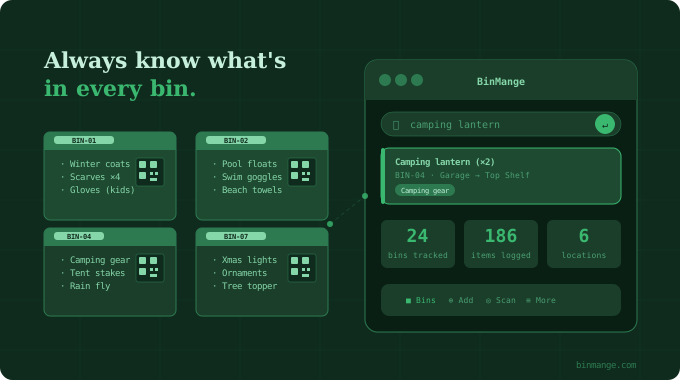
You bought those holiday decorations, the camping gear, the kids' old clothes — and now they're somewhere in a plastic bin in the garage. Or the basement. Or maybe the storage unit? Sound familiar?
If you've ever torn apart a stack of unlabeled totes searching for something you know you own, you already understand the problem. What you need is a storage bin inventory app — a dedicated tool that tells you exactly what's in each bin, where that bin lives, and how to find it without playing archaeological dig in your own home.
This guide covers what to look for in a storage bin inventory app, who benefits most, and why BinMange is the tool that finally makes home storage feel manageable.
Why a Generic App Won't Cut It
Your first instinct might be to reach for a notes app or a spreadsheet. And sure, you could log "Bin #1 — Christmas stuff" in a Google Doc. But that breaks down fast:
- No quick search. Ctrl+F works on text, not on the mental model of your garage.
- No location tracking. Which shelf? Which room? Which off-site storage unit?
- No photos. Written descriptions age poorly; a photo of the bin's contents speaks for itself.
- No barcodes. Labeling bins and scanning them is 10x faster than typing.
A purpose-built storage bin inventory app solves all of this. It's designed around the specific workflow of: label bin → log contents → find item later.
What to Look for in a Storage Bin Inventory App
When evaluating your options, prioritize these features:
1. Bin-Level Organization
The app should think the way you think — in containers. Each bin is its own record, with a name, label, and list of contents. Not a flat list of items where you have to remember which bin something is in.
2. Location Hierarchy
You don't just have "bins." You have bins on shelves, in rooms, in buildings. A good storage app lets you nest locations — so you can drill down from "Garage → Wall Shelves → Top Row → Bin 4" in seconds.
3. Photo Support
Photos are worth thousands of typed words when it comes to bin contents. Snap a photo when you pack the bin, and you'll never have to guess whether the sleeping bags are in the navy tote or the gray one.
4. Search That Actually Works
Fast, full-text search across all bin contents is non-negotiable. You should be able to type "camping lantern" and immediately see which bin it's in and where that bin is located.
5. Label Printing or QR Codes
Physical labels close the loop between your digital inventory and the real world. Scan a QR code on a bin and you're instantly looking at that bin's contents on your phone. No memory required.
6. Sharing and Collaboration
Households aren't solo operations. Everyone in the family should be able to look up where the Halloween costumes are — not just the person who organized them.
Who Needs a Storage Bin Inventory App Most
Not everyone has the same storage problem. Here's who benefits most from getting organized with an app:
Homeowners with garages, attics, or basements — the classic use case. Large, infrequently-accessed storage spaces where items get buried and forgotten.
People using self-storage units — when your bins are off-site, a digital inventory is practically essential. You don't want to drive 20 minutes to dig through three boxes only to find what you need isn't there.
Families managing seasonal gear — holiday decorations, sports equipment, camping supplies, school supplies. The same bins come out year after year; you might as well know what's in them.
Small businesses and resellers — if you're running an e-commerce side hustle out of your home, keeping SKU-level inventory in labeled bins is how you ship fast without chaos.
Anyone who's moved recently — moving boxes and storage bins share the same problem: opaque containers full of mystery. An inventory app makes unpacking (or re-packing) strategic instead of exhausting.
How BinMange Handles Storage Bin Inventory
BinMange was built specifically for this workflow. Here's how it approaches the problem differently:
Bins are first-class objects. In BinMange, you're managing bins, not just lists of items. Each bin has its own profile — name, label, location, photos, notes, and contents list. The whole app is organized around the physical containers you already use.
Nested locations. BinMange lets you build a location tree that mirrors your actual space. Assign a bin to a specific shelf in a specific room in a specific building. When you search for an item, you get the full address — not just "the basement."
QR code labels. Print QR code labels directly from BinMange and stick them on your bins. Point your phone camera at any bin and you're looking at its contents instantly. No typing, no hunting through menus.
Fast search across all bins. Type any item name and BinMange surfaces every bin containing that item along with its location. It's the closest thing to having a photographic memory of your entire storage system.
Photo logging. Add photos when you pack a bin so you have a visual record. Especially useful for seasonal bins you won't open again for months.
Household sharing. Invite family members or housemates so everyone has access to the same inventory. No more "I don't know where that is, ask Mom."
Getting Started: A Simple System That Works
You don't have to organize everything at once. Here's a practical approach to rolling out a storage bin inventory system:
- Start with the bins you access most. Your top 10 most-used bins will give you 80% of the value. Log those first.
- Label as you go. When you pull something out of a bin, log it. When you put it back, update the entry. Build the habit in small steps.
- Take one photo per bin. Even a quick overhead snapshot of the open bin before you close the lid is enough.
- Use consistent naming. "Holiday - Christmas" and "Christmas Decorations" and "Xmas Stuff" are all the same thing. Pick a naming convention and stick to it.
- Add locations before items. Set up your location hierarchy first (rooms → shelves → zones) so every bin has a proper home in the system.
The Bottom Line
A storage bin inventory app isn't a luxury for ultra-organized people — it's a practical tool for anyone who's tired of not knowing what they own or where it is. The right app pays for itself the first time it saves you from buying something you already have, or from spending an hour searching for something you needed five minutes ago.
BinMange is built for exactly this. It's not a generic task manager or a spreadsheet dressed up with a nice UI. It's a storage bin inventory app, designed from the ground up around the way people actually store things.
Ready to stop guessing and start knowing? Try BinMange free →